

The entire e-reader market has seen a massive hardware refresh recently, pulling us far away from the sluggish, low-contrast devices of the past decade. Manufacturers have finally listened to what heavy readers actually want, prioritizing speed, eye comfort, and seamless library syncing over useless gimmicks.
We are seeing faster processors that make page turns instantaneous and advanced color technology that does not drain your battery in a few hours. These specialized gadgets strip away the endless pings of social media and email, forcing you to slow down and actually immerse yourself in a story. When you read on a phone, you are always waiting for the next notification to pull you away from the page.
A dedicated reader builds a wall around your focus. Whether you want an open Android ecosystem or a tightly integrated brand experience, there has never been a better time to upgrade your digital library. The newest models offer unparalleled screen clarity, massive storage bumps, and highly responsive touch interfaces that finally feel as fast as a modern smartphone.
|
Feature Category |
Older Generation E-Readers |
2026 Reading Tablets |
|
Screen Technology |
Basic Pearl E-Ink with low contrast |
Kaleido 3 Color and Carta 1300 monochrome |
|
Processing Speed |
Noticeable page lag and ghosting |
Instantaneous page refresh with zero lag |
|
Storage Capacity |
Limited to 2GB or 4GB |
Starting at 16GB, expanding up to 128GB |
|
Lighting Systems |
No front light or harsh blue LEDs |
Auto-adjusting warm LEDs for night reading |
Why Choose a Dedicated Reading Tablet in 2026?
It makes perfect sense to question buying a single-purpose gadget when our phones already do practically everything. However, the exact reason these devices excel is that they are intentional bottlenecks to the digital noise we face all day. A dedicated reading tablet is built from the ground up to protect your attention span and prioritize the reading experience above all else. You get specialized hardware engineered for textual clarity, software that organizes your library perfectly, and an environment completely free from group chat notifications. It is a quiet oasis in a very loud digital world.
E-Ink Display Technology vs. LCD and OLED Screens
You might wonder why you cannot just read on your phone and save some cash, but the secret sauce of any dedicated reading device is the electronic ink display. Unlike traditional LCD or OLED screens that blast glaring backlights directly into your pupils, electronic ink relies on tiny physical microcapsules filled with charged particles. When an electrical current hits them, these black and white particles physically move to the top of the screen to form words and images. Because this technology literally reflects ambient light just like a piece of physical paper, you get zero glare even if you are reading on a sunny beach at high noon.
This setup drastically reduces eye strain and allows you to read for hours without feeling like you have been staring at a computer monitor. Plus, modern reading devices use an advanced front light system. Instead of shining light into your eyes, tiny LEDs hidden in the bezel project light downward across the display. Many models now feature adjustable warm lighting, allowing you to shift the screen color from a crisp white during the day to a deep, soothing amber at night, protecting your sleep schedule.
|
Display Feature |
LCD / OLED Screens |
E-Ink Displays |
|
Light Source |
Backlit directly into the eyes |
Front-lit projected across the screen |
|
Outdoor Viewing |
Heavy glare, hard to read in sunlight |
Zero glare, highly readable in sunlight |
|
Eye Fatigue |
High strain after prolonged use |
Minimal strain, mimics physical paper |
|
Refresh Rate |
60Hz to 120Hz for smooth video |
Slower, optimized for static text |
Unmatched Battery Life and Ultimate Portability
The way electronic ink draws power provides a massive advantage for travelers and heavy readers who hate carrying extra charging cables. Your smartphone screen needs constant energy just to stay turned on and refresh dozens of times a second. An E-Ink screen only uses battery power when you actually flip a page or interact with the menu system. If you are just staring at a page of text, the device uses absolutely zero energy to maintain that static image.
This is exactly why you measure an e-reader battery life in weeks or even months, rather than hours. You can toss one in your travel bag for a two-week European vacation and never even bother packing the charger. Beyond battery life, these devices are incredibly lightweight and ergonomically designed. Most top-tier models weigh substantially less than a standard paperback novel, saving your wrists from cramping when you want to read in bed for an hour before sleep. This combination of endless battery and feather-light design makes them the ultimate travel companion for book lovers.
|
Portability Metric |
Smartphone / Standard Tablet |
Dedicated E-Reader |
|
Average Battery Life |
10 to 18 hours of screen time |
4 to 12 weeks per charge |
|
Power Draw |
Constant drain while screen is on |
Only draws power during page turns |
|
Average Weight |
450 grams to 700 grams |
150 grams to 200 grams |
|
Travel Convenience |
Requires daily charging routines |
Can travel for weeks without a charger |
Top Picks for the Best Tablets for Reading in 2026
With so many brands competing for your attention, narrowing down the choices can feel overwhelming. We have broken down the market into distinct categories to help you find exactly what you need. From massive library ecosystems to highly portable pocket devices, these are the standout pieces of hardware that completely dominate the reading space right now. We looked closely at screen clarity, software responsiveness, build quality, and ecosystem freedom.
Amazon Kindle Paperwhite (12th Gen): The Best Overall E-Reader
Amazon completely refreshed their lineup recently, and the 12th generation Kindle Paperwhite remains the undisputed king of the hill for the vast majority of readers. It strikes the perfect balance between premium features and a totally reasonable price tag. The latest iteration bumps the screen size up to a generous 7 inches while retaining a razor-sharp 300 pixels per inch resolution, ensuring text looks incredibly crisp. Amazon also massively upgraded the internal processor, claiming a 20 percent increase in page turn speed, and you can absolutely feel that snappy response when navigating your library.
It comes standard with 16GB of storage, which comfortably holds thousands of standard novels without breaking a sweat. You still get the fantastic IPX8 waterproofing, so dropping it in the bathtub or reading by the pool is a complete non-issue. The battery life has also been pushed to an impressive 12 weeks on a single charge. While you are locked into the Amazon ecosystem, the sheer convenience of the Kindle store, Whispersync technology, and seamless Goodreads integration makes it the most frictionless reading experience available today.
|
Kindle Paperwhite Feature |
Specification Detail |
|
Screen Size & Resolution |
7-inch Carta 1300 E-Ink, 300 ppi |
|
Storage Options |
16GB standard, up to 32GB Signature Edition |
|
Waterproofing |
IPX8 rated (submersion in 2 meters of water) |
|
Battery Life Claim |
Up to 12 weeks based on a half hour of daily reading |
Kobo Libra Colour: The Best Color E-Reader Experience
For years, readers begged for a device that could show book covers and graphic novels in color without sacrificing the incredible battery life of E-Ink. Kobo delivered massively with the Libra Colour, utilizing the latest Kaleido 3 screen technology to bring soft, pastel-like hues to your digital library. This completely transforms how you read visual content like comics, cookbooks, and magazine articles. The Libra Colour features a brilliant asymmetrical design with physical page-turn buttons right on the bezel, meaning the center of gravity rests perfectly in your palm for one-handed reading.
The 7-inch display shows black text at a crisp 300 ppi, while the color layer renders at 150 ppi, giving images a charming vintage newspaper look. Where Kobo truly crushes the competition is its flawless library integration. It has native OverDrive support built directly into the operating system, so you simply log in with your local public library card to browse, borrow, and read library books instantly. Kobo has also partnered with iFixit to make the device highly repairable, allowing you to swap the battery yourself when it eventually degrades.
|
Kobo Libra Colour Feature |
Specification Detail |
|
Color Display Tech |
E-Ink Kaleido 3 (150 ppi color, 300 ppi B&W) |
|
Physical Design |
Asymmetrical bezel with tactile page-turn buttons |
|
Library Integration |
Native built-in OverDrive support |
|
Repairability |
iFixit partnership for DIY battery and screen replacements |
Onyx Boox Palma 2 Pro: The Best Pocket-Sized Android E-Reader
If you want a reading device that physically matches the shape and feel of your smartphone, the Onyx Boox Palma 2 Pro is an absolute marvel of modern engineering. It slides effortlessly into your jeans pocket, making it the perfect companion for reading on crowded subway commutes or while waiting in line for coffee. The Palma 2 Pro runs on a full version of Android 15 and comes with the Google Play Store pre-installed, meaning you have zero ecosystem restrictions holding you back.
You can download the Kindle app, the Kobo app, Libby, Marvel Unlimited, and even news apps like the New York Times all on one single device. It features a 6.13-inch Kaleido 3 color screen, a snappy octa-core processor, and 8GB of RAM, making it easily the fastest device on this list. The custom Boox Super Refresh technology eliminates the annoying ghosting typically seen when scrolling on E-Ink screens. It even features a hybrid SIM slot, so you can use cellular data to download books or read articles on the go without hunting for public Wi-Fi networks.
|
Boox Palma 2 Pro Feature |
Specification Detail |
|
Operating System |
Full Android 15 with Google Play Store |
|
Screen Specifications |
6.13-inch Kaleido 3 Color display |
|
Internal Hardware |
Octa-core processor with 8GB RAM and 128GB storage |
|
Connectivity |
Wi-Fi, Bluetooth, and Hybrid Cellular SIM slot |
Apple iPad Mini: The Best Multipurpose Tablet for Reading
We have to acknowledge that some people simply do not enjoy the matte, paper-like look of E-Ink screens. If your reading diet consists entirely of high-definition digital magazines, massive PDF textbooks with complex charts, or vibrant Marvel comics, a traditional e-reader will definitely struggle to keep up. For these visually heavy tasks, the newest Apple iPad Mini is the absolute best multipurpose choice available. The iPad Mini features a stunning 8.3-inch Liquid Retina display that produces incredibly vibrant colors, deep contrasts, and extreme brightness levels.
Textbooks look phenomenal, and zooming in on technical diagrams is totally flawless thanks to the highly powerful internal Apple silicon chip. Because it runs iPadOS, it handles heavy, image-dense files that would completely crash a standard E-Ink processor. The trade-off is obviously battery life and eye strain, as you will need to charge it every few days and deal with screen glare outdoors. However, the ability to switch instantly from reading a novel to taking notes with the Apple Pencil makes it an ultimate all-in-one productivity tool.
|
iPad Mini Feature |
Specification Detail |
|
Display Quality |
8.3-inch Liquid Retina LCD screen |
|
Processing Power |
High-end Apple Silicon chip for heavy PDF handling |
|
Multitasking |
Full iPadOS for running multiple apps side-by-side |
|
Drawbacks for Reading |
Battery measured in hours, heavy screen glare outdoors |
Amazon Kindle Colorsoft: The Premium Color Kindle
Amazon finally entered the color E-Ink arena late last year with the highly anticipated Kindle Colorsoft, designing it specifically for users who refuse to leave the Amazon ecosystem but desperately want a splash of color. This premium device brings book covers to life and allows for highly vibrant, multi-colored highlighting directly on the page. The Colorsoft utilizes heavily optimized display layers to provide bright, paper-like colors that look fantastic under the built-in front light.
Just like the Kobo, it features a monochrome resolution of 300 ppi for ultra-sharp standard text, while the color resolution handles images at 150 ppi. Being able to highlight your favorite quotes in yellow, blue, pink, or orange is a truly fantastic study tool for students and non-fiction fans who like to categorize their notes. It shares the same gorgeous flush-glass front design as the premium Paperwhite Signature Edition, making it feel incredibly sturdy and high-end in the hand. While the colors are slightly muted compared to an LCD screen, they are absolutely perfect for reading travel guides and graphic novels outdoors without any harsh glare.
|
Kindle Colorsoft Feature |
Specification Detail |
|
Color Resolution |
150 ppi color layer for covers and highlights |
|
Highlighting Tools |
Multi-color highlight support (yellow, blue, pink, orange) |
|
Build Quality |
Flush glass front with premium metallic casing |
|
Ecosystem |
Locked to Amazon Kindle store and Audible integration |
Boox Go 6 Gen II: The Upgraded Open Ecosystem Choice
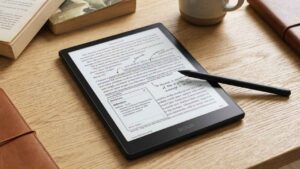
If you love the idea of an open Android ecosystem but you do not want to spend a fortune on a flagship device, Onyx Boox updated their budget-friendly line with the excellent Go 6 Gen II. It keeps the traditional wider reading aspect ratio compared to the Palma, making it feel more like a classic reading device while packing the ultimate freedom of the Google Play Store inside. The second generation of the Go 6 addressed the biggest complaint of the original by boosting the internal memory to 3 gigabytes of RAM.
This makes a massive difference when running standard Android applications, allowing you to flip between your library app, a web browser, and a dictionary without the system stuttering or crashing. Impressively for this price tier, the Go 6 Gen II now completely supports the Boox InkSense Plus stylus, transforming a basic pocket reader into a functional digital scratchpad. You can jot down quick notes, sign PDF documents, or annotate your books directly on the screen. It features a crisp black-and-white display that provides excellent contrast for text-heavy readers who prioritize clarity.
|
Boox Go 6 Gen II Feature |
Specification Detail |
|
Memory Upgrade |
3GB of RAM for smoother Android app performance |
|
App Freedom |
Unrestricted access to Google Play Store apps |
|
Stylus Support |
Compatible with Boox InkSense Plus for note-taking |
|
Screen Style |
Traditional 6-inch monochrome Carta E-Ink display |
Device Comparison at a Glance
Choosing the right hardware requires looking closely at how these devices stack up against one another in a direct comparison. We have compiled the critical specifications that actually matter for daily reading so you can see exactly where your money goes. Notice how battery life and operating systems wildly differ between the dedicated E-Ink devices and standard multipurpose tablets.
An open Android system gives you ultimate app freedom but drains the battery slightly faster than a locked-down Kindle or Kobo system. A 7-inch screen is generally considered the sweet spot for reading novels, but 6-inch devices offer superior pocketability. Review these data points to understand which hardware compromises make the most sense for your daily reading habits and budget.
|
Device Name |
Screen Size |
OS Platform |
Color Display |
Best Use Case |
|
Kindle Paperwhite 12th Gen |
7.0 inches |
Amazon OS |
No |
Best overall value and store convenience |
|
Kobo Libra Colour |
7.0 inches |
Kobo OS |
Yes |
Best local library and comic integration |
|
Boox Palma 2 Pro |
6.13 inches |
Android 15 |
Yes |
Best ultimate pocket-sized portability |
|
Apple iPad Mini |
8.3 inches |
iPadOS |
Yes |
Best for heavy PDFs and multimedia |
|
Kindle Colorsoft |
7.0 inches |
Amazon OS |
Yes |
Best premium Amazon color experience |
|
Boox Go 6 Gen II |
6.0 inches |
Android 11 |
No |
Best budget-friendly open ecosystem |
How to Choose the Right Reading Device for Your Needs?
Dropping a few hundred dollars on a digital reading slab requires a bit of self-reflection about your actual reading habits. Buying the most expensive model is completely useless if it does not integrate with where you actually buy or borrow your books. Here are the most critical factors you need to evaluate before making your final decision.
Ecosystem Lock-In and Library Integration
The most important decision you will make before buying hardware is choosing your digital ecosystem. When you buy an Amazon Kindle, you are generally committing to purchasing your books directly through the Amazon store. While it is possible to sideload content via their cloud service, Amazon makes the process slightly more cumbersome than its competitors to keep you in their walled garden.
However, the Kindle store has the absolute largest selection on earth, and services like Kindle Unlimited offer incredible value for fast readers. If you prefer to support independent bookstores or rely heavily on your local public library, Kobo devices are a vastly better choice. Their native OverDrive integration makes borrowing library books an incredibly frictionless experience right from the device. Alternatively, if you refuse to be tied down to any single storefront, an Android-based e-reader like those from Onyx Boox allows you to install the Kindle app, the Kobo app, and the Libby app all at once.
|
Ecosystem |
Pros |
Cons |
|
Amazon Kindle |
Massive store, Kindle Unlimited, Whispersync |
Harder to sideload, locked hardware |
|
Rakuten Kobo |
OverDrive integration, great EPUB support |
Smaller overall store selection than Amazon |
|
Open Android |
Access to all apps via Google Play Store |
Steeper learning curve, slightly worse battery |
Storage Capacity and Supported File Formats
You really need to consider how much digital media you plan to store locally before picking a storage size. Standard text-based novels take up a fraction of a megabyte, meaning a basic 8-gigabyte e-reader can comfortably hold thousands of books. However, if you plan to listen to massive audiobooks via Bluetooth or read storage-heavy graphic novels and manga, you should definitely aim for a device with at least 32 gigabytes of storage or expandable memory via a microSD card slot.
You should also verify exactly which file formats a device supports natively out of the box. Kobo and Boox e-readers that completely support the EPUB format without requiring file conversion offer a much smoother experience. This is crucial for readers who purchase DRM-free books from various online retailers, download public domain literature, or back up digital books from independent bundle sales.
|
Media Type |
Average File Size |
Recommended Device Storage |
|
Standard Text Novel |
1MB to 3MB |
8GB is plenty for thousands of books |
|
Comic Book / Manga |
50MB to 150MB |
16GB to 32GB minimum |
|
High-Quality Audiobook |
150MB to 300MB |
32GB or expandable MicroSD |
|
Heavy Academic PDFs |
10MB to 100MB+ |
32GB and a fast processor needed |
To Color or Not to Color?
The introduction of high-quality color E-Ink is genuinely exciting, but it is definitely not necessary for every single reader. If you exclusively read traditional text-based novels, thrillers, and biographies, a classic black-and-white display is actually superior. Standard monochrome E-Ink screens typically offer better contrast, slightly sharper text clarity, and a brighter background without needing to engage the LED front light.
The color filter layer on devices like the Libra Colour inherently makes the screen background slightly darker and grayer. However, if your reading diet consists of cookbooks, travel guides, comic books, or non-fiction texts that rely heavily on color-coded charts and graphs, the investment in a color screen is absolutely worthwhile. It brings a new layer of immersion to visual media that monochrome screens simply cannot replicate.
|
Screen Type |
Best Suited For |
Visual Drawbacks |
|
Monochrome E-Ink |
Pure text fiction, long reading sessions |
Cannot display colored graphs or covers |
|
Color E-Ink (Kaleido 3) |
Comics, highlighting, non-fiction |
Slightly darker background, muted colors |
|
LCD / OLED Color |
High-def magazines, heavy multimedia |
Massive eye strain, terrible outdoor glare |
Essential Accessories for Your Reading Tablet
Your new reading device is an investment, and tossing it bare into a backpack full of keys and laptops is a guaranteed way to ruin the screen. Electronic ink displays are uniquely fragile, so spending a little extra on the right accessories is mandatory for long-term survival. Here is what you need to protect your gear.
Protective Cases and Screen Protectors
Electronic ink screens are uniquely fragile compared to the heavy Gorilla Glass used on standard smartphones. A sudden impact or even heavy, sustained pressure in a packed backpack can cause the internal microcapsules to permanently rupture, ruining the display with frozen lines. A sturdy, protective folio case that covers the screen completely when not in use is absolutely essential for hardware survival.
We highly recommend purchasing a smart case that features a magnetic closure system. These cases automatically put the device to sleep when closed and wake it up instantly when opened, adding a layer of convenience that mimics opening a real book. If you plan to use a stylus heavily, applying a matte screen protector is also a great idea. It adds a pleasant paper-like friction for writing and stops the hard plastic stylus nib from leaving micro-scratches on your screen over the years.
|
Accessory Type |
Purpose |
Key Feature to Look For |
|
Smart Folio Case |
Protects screen from pressure and drops |
Magnetic sleep/wake functionality |
|
Screen Protector |
Prevents scratches from daily use and styluses |
Matte finish to prevent unwanted glare |
|
Travel Sleeve |
Extra padding for throwing in a backpack |
Water-resistant neoprene material |
Styluses for Note-Taking and Annotation
If you purchased an e-reader with note-taking capabilities, upgrading to a premium third-party stylus can completely change how you interact with the device. While the basic pens included in the box by manufacturers are definitely functional, premium options offer a far superior writing experience. Look for styluses that utilize Wacom EMR technology, which means they never need to be charged or paired via Bluetooth.
Premium options often feature much better weight distribution in the hand, customizable shortcut buttons on the barrel for quick highlighting, and dedicated digital erasers on the back end. This makes the entire process of highlighting text, scribbling margin notes, and journaling feel incredibly natural. Having a good pen makes you want to engage with your texts on a much deeper level.
|
Stylus Feature |
Benefit for the Reader |
|
Wacom EMR Technology |
Never requires a battery charge or Bluetooth pairing |
|
Built-in Digital Eraser |
Flip the pen around to erase quickly without menus |
|
Programmable Buttons |
Instantly switch between pen and highlighter modes |
|
Textured Nibs |
Mimics the exact friction of a real pen on paper |
The Future of Digital Reading
The hardware landscape in 2026 proves that the industry is finally maturing beyond basic text rendering. We are watching standard reading tablets merge heavily with digital productivity tools, creating a new category of intelligent, distraction-free workstations. The next few years will push these boundaries even further.
Repairability and Sustainability
One of the most encouraging trends sweeping the e-reader market in 2026 is the massive push toward consumer repairability and reducing toxic e-waste. For years, if your e-reader battery degraded or you cracked the screen, the entire device ended up in a landfill. Companies like Kobo are leading the charge by partnering directly with third-party repair advocates like iFixit to completely change this narrative.
They now provide official replacement parts, utilize accessible screws instead of heavy industrial glue, and publish step-by-step DIY repair manuals online. As consumers become much more conscious of electronic waste and hardware longevity, the ability to easily swap out a dead battery at your kitchen table for thirty bucks will become a standard expectation. We fully expect other major players like Amazon to adopt these sustainable practices as legislative pressure for the right to repair continues to grow globally.
|
Repairability Aspect |
Past Industry Standard |
2026 Sustainable Standard |
|
Battery Replacement |
Glued in, required complete device replacement |
Screwed in, user-replaceable with simple tools |
|
Parts Availability |
None available to the public |
Official parts sold directly to consumers |
|
Repair Manuals |
Kept secret by manufacturers |
Published freely online with step-by-step guides |
|
Environmental Impact |
High e-waste generation |
Significantly extended hardware lifespan |
Final Thoughts
The sheer variety of hardware available right now ensures there is a perfect match for every single type of reader. We have seen incredible leaps in screen clarity, battery efficiency, and processing power that make the devices of just a few years ago feel ancient. If you want a completely frictionless experience backed by the largest bookstore on earth, the Kindle Paperwhite 12th Gen remains an absolute powerhouse and the safest bet for most people. If you are an active public library user who heavily values sustainability and repairability, the Kobo Libra Colour will completely revolutionize your reading routine.
For readers who demand ultimate app freedom in a totally portable package, the Boox Palma 2 Pro is a true engineering masterpiece. Take a close look at exactly where you source your books and what kind of media you consume daily. The best tablets for reading 2026 offers are purposefully designed to fade completely into the background, letting the author’s words take center stage without digital distractions. Grab a cup of coffee, power up your new device, and get lost in a great book.
Frequently Asked Questions (FAQs) About Best Tablets for Reading 2026
Are color e-readers worth the upgrade?
If you frequently read content that relies heavily on visual elements, such as comic books, manga, digital magazines, or textbooks with color-coded graphs, a color e-reader is a fantastic investment. The Kaleido 3 technology brings those visuals to life beautifully. However, if your library consists entirely of text-only fiction and biographies, a standard black-and-white e-reader will actually provide slightly better text contrast, a whiter background, and a cheaper price point, making it the smarter buy for purists.
Which reading tablet is best for eye health?
Any device utilizing a dedicated E-Ink display is vastly superior for eye health compared to standard LCD or OLED tablets like an iPad. E-Ink reflects ambient light rather than emitting harsh backlights directly into your pupils. For the absolute best eye care experience, look specifically for an e-reader that offers an adjustable warm light feature. This allows you to manually shift the screen temperature to a soothing amber tone, significantly reducing blue light exposure during evening reading sessions.
Can I read library books on my e-reader for free?
Yes, absolutely, and it is one of the best ways to save money. The easiest and most frictionless way to borrow library books is by using a Kobo device, which features seamless, built-in integration with the OverDrive system. Android-based e-readers from companies like Onyx Boox can also easily access library books by downloading the Libby app directly from the Google Play Store. While you can send library books to a Kindle using the Libby smartphone app, the process is clunkier and generally restricted to US libraries.
Do I really need a waterproof e-reader?
While not strictly necessary for every single person, waterproofing provides excellent peace of mind and expands where you can read. If you enjoy reading in the bathtub, lounging by the pool on vacation, or taking your device to the beach, an IPX8 waterproof rating ensures that accidental splashes or brief submersions will not destroy your expensive hardware. Given that excellent waterproofing is now a standard feature on many mid-range models like the Paperwhite, we highly recommend grabbing a waterproof device.
How long should an e-reader last?
With proper care and a good case, a dedicated e-reader can easily last five to seven years, or even longer. Because the software demands are very low compared to modern smartphones, e-readers simply do not suffer from the same rapid software obsolescence or processor lag. The most common point of failure over time is lithium-ion battery degradation. This is exactly why the recent trend toward user-repairable batteries from brands like Kobo is so important for keeping these devices out of landfills.