
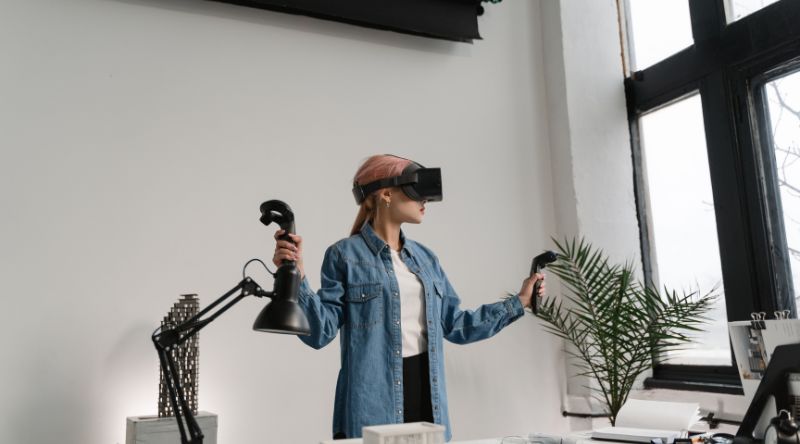
For decades, we have lived our lives looking down. We stare at the rectangular glass in our hands, glare at monitors on our desks, and sit before televisions in our living rooms. Our digital experiences are trapped inside flat, restrictive boxes. But a quiet, massive shift is happening right around us. The digital world is breaking free from its glass cages.
This transformation centers on a concept that is rapidly replacing traditional computing interfaces: spatial computing. By blending the physical environment with digital data, it completely redefines how we work, play, and connect. It takes our software off the desk and drops it right into our physical rooms. Let’s look closely at what is spatial computing and how it changes screens.
Why This Topic Matters
The way we interact with information dictates how we build society. When computers shifted from command-line text to graphical user interfaces (like windows and icons), it allowed billions of people to use PCs. When screens became mobile and touch-based, it birthed the modern app economy.
Spatial computing represents the next multi-decade computing platform wave. The market reflects this massive momentum; the global spatial computing market size is projected to soar from $225.59 billion in 2026 to over $1 trillion by 2034. We are moving away from being passive viewers of a screen to active participants inside a digital canvas. Understanding this shift is essential because it will alter everyday workflows, consumer hardware, data privacy, and the literal fabric of digital design over the next decade.
Top 6 Ways Spatial Computing Redefines the Screen
To fully grasp what is spatial computing and how it changes screens, we must examine how specific technologies alter our everyday hardware. Here are six major ways our relationship with digital displays is permanently transforming.
Item #1: The Elimination of Physical Glass Boundaries
Traditional screens force apps to fight for real estate. Spatial computing eliminates physical displays entirely, transforming your entire room into an infinite workspace where apps can float anywhere.
With spatial computing, your monitors are replaced by high-resolution passthrough video feeds. Devices map your environment using light detection and ranging (LiDAR) and infrared sensors, allowing web browsers, video players, and chat windows to hang mid-air, scale to the size of a wall, or tuck quietly into a corner.
|
Key Feature |
Traditional Display |
Spatial Computing Display |
|
Display Limit |
Fixed diagonal inches (e.g., 27″) |
Infinite, restricted only by field of view |
|
Multitasking |
Window snapping, multi-monitor setups |
3D room placement, apps anchoring to walls |
|
Portability |
Heavy desktop hardware required |
Lightweight glasses or standalone headsets |
Item #2: Natural User Interfaces Replacing Keyboards and Mice
For years, we translated human intent into clicks, scrolls, and taps. Spatial computing completely ditches these intermediaries, relying on eye movements, hand gestures, and voice commands to control data.
Devices track your gaze with extreme precision. Looking at an app icon subtly highlights it; pinching your fingers together acts as a click. This shift means screens are no longer objects you physically touch. Instead, the interface responds directly to your biological movements, making the tech feel like an extension of your own body.
|
Input Metric |
Old Ecosystem (2D) |
New Ecosystem (Spatial) |
|
Navigation |
Mouse movement, trackpad swipes |
Precise eye-tracking and gaze detection |
|
Selection |
Physical click, capacitive finger tap |
Micro-gestures (e.g., finger pinch) |
|
Input Command |
Keyboard shortcuts, typing |
Natural voice dictation and spatial cues |
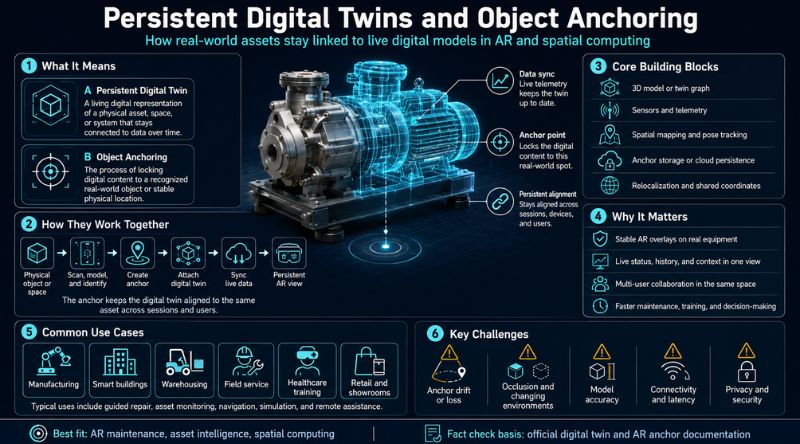
Item #3: Persistent Digital Twins and Object Anchoring
On a traditional screen, closing a laptop means your workspace vanishes. In spatial computing, digital objects stay permanently anchored in real-world geographic coordinates.
If you place a virtual calendar on your kitchen wall and a 3D model of a building project on your studio desk, those objects remain exactly where you left them. When you put your headset back on days later, the spatial operating system remembers the coordinates and displays them in the identical spot, creating a persistent, hybrid reality.
|
Anchoring Attribute |
Description |
|
Spatial Mapping |
Continuous mesh generation of furniture and walls. |
|
Persistence |
Apps stay locked in physical space even after rebooting. |
|
Shared Spaces |
Multiple local users view the exact same spatial object. |
Item #4: From 2D Content to True Depth Perception
Flat screens simulate depth through lighting and shading tricks. Spatial computing displays true stereoscopic 3D content, allowing objects to have genuine volume, shadows, and perspective.
This makes a radical difference for professional workflows. Designers, engineers, and surgeons no longer have to look at flat blueprints or cross-sections. They can walk around a life-sized virtual engine, look beneath its components, and manipulate parts with realistic depth perception, dramatically lowering design errors and shortening production timelines.
|
Advantage Area |
2D Limitations |
3D Spatial Benefit |
|
Data Review |
Rotating a 3D model with a mouse on a flat UI |
Physically walking around a life-sized asset |
|
Scale Context |
Scaling a zoom percentage (e.g., 150%) |
Observing objects in true 1:1 real-world size |
|
Lighting Accuracy |
Baked-in rendering textures |
Real-time shadows matching your actual room |
Item #5: Contextual Augmented Reality via Lightweight Glasses
While large headsets dominate the current narrative, the ultimate destination for spatial computing is everyday eyewear that layers real-time data directly onto the real world.
As processing components shrink, bulky goggles are giving way to sleek smart glasses. Instead of pulling out a phone to look at maps, directions are projected directly onto the sidewalk in front of you. Restaurant reviews hover over real storefronts, and text messages appear subtly in your peripheral vision, eliminating the dangerous habit of looking down while walking or driving.
|
Tech Layer |
Current Headsets (MR/VR) |
Next-Gen Smart Glasses (AR) |
|
Form Factor |
Enclosed visors, heavier weight |
Lightweight frames, transparent lenses |
|
Environment |
Passthrough cameras digitizing the room |
Direct line of sight with wave-guide optics |
|
Primary Use Case |
Heavy productivity, immersive gaming |
All-day contextual notifications, navigation |
Item #6: Spatial Audio Enhancing Environmental Realism
Screens have historically separated visual data from audio. Spatial computing binds sound to specific physical locations within your room, making audio sound completely three-dimensional.
If a video window is floating ten feet away to your left, the sound waves are processed to hit your left ear slightly before your right, mimicking real-world acoustics. If you walk closer to the window, the sound grows louder. If you turn away, it shifts behind you. This auditory anchoring tricks your brain into accepting virtual elements as real physical objects.
|
Audio Type |
Delivery Mechanism |
Environmental Impact |
|
Traditional Audio |
Stereo or basic surround channels |
Audio sounds like it is inside your ears or uniform |
|
Spatial Audio |
Dynamic acoustic head-tracking |
Sound bounces off virtual walls, matching visual depth |
What Is Spatial Computing and How It Changes Screens: Challenges on the Horizon
Despite the incredible potential of what is spatial computing and how it changes screens, the road ahead has significant bumps. It is not just about cool visuals; we have to consider the friction of adopting this technology widely.
- Privacy and Data Sovereignty: These devices are essentially always-on camera and sensor arrays. They map your home, track your eyes, and can record bystanders without their explicit consent. Protecting this deeply intimate biometric and environmental data is a massive hurdle for the tech sector.
- Physical Comfort and Ergonomics: Wearing a device packed with batteries, glass, and aluminum on your face causes neck strain and facial fatigue over extended periods. Mass adoption relies heavily on shrinking these systems down to the size of a standard pair of reading glasses.
- The High Cost Barrier: High-end spatial computing systems cost thousands of dollars, pricing out a massive chunk of everyday consumers. Until manufacturing scales down the pricing curve, it will remain largely an enterprise or enthusiast tool.
Conclusion
When we look back at the history of technology, the era of flat, isolated screens will likely look like a brief transition phase. By looking deeply at what is spatial computing and how it changes screens, we see a future where our environments become inherently digital.
Information is moving from a pane of glass on your desk into the physical space you occupy. While the hardware is still maturing, the paradigm shift is absolutely irreversible. We are stepping away from the glass box, lifting our heads up, and entering a world where computing is as natural, open, and infinite as the air around us.
Uncommon FAQs
Can spatial computing run without an internet connection?
Yes, core spatial features like environment mapping, gesture tracking, locally installed apps, and offline video playback function entirely on local hardware. However, collaborative tools, cloud computing twins, and web browsing still require a standard network connection.
Do spatial computing devices work for people with vision impairments or glasses?
Most premium spatial headsets require custom prescription lens inserts because your glasses cannot safely fit inside the enclosed visor. For accessibility, modern spatial operating systems include comprehensive voice-over controls, head-tracking alternatives, and single-eye tracking modes for those who cannot use standard gaze navigation.
Does spatial computing cause eye strain compared to looking at regular monitors?
It can, but for a different reason. Spatial devices use lenses that trick your eyes into focusing at a fixed focal distance (usually around 1.5 to 2 meters away), regardless of how close a virtual window appears. This mismatch can cause a form of fatigue known as the vergence-accommodation conflict, though newer display panels are actively trying to minimize this effect.