
Choosing a home security camera used to be simple. You checked the video quality, looked at the price, and picked the one that worked with your phone. In 2026, it’s not that easy anymore.
The real question is not just which camera looks sharp. It’s which brand gives you the right mix of video quality, alerts, app control, storage, smart home support, privacy, and monthly cost. That’s why this ring vs nest vs arlo comparison matters. These three brands still dominate the smart home camera conversation, but they now serve slightly different buyers.
Ring is best for people who want a simple security setup with strong doorbell options and an Amazon Alexa ecosystem. Nest fits people who already use Google Home and want smarter AI features through Google Home Premium. Arlo is better for users who care most about camera quality, wireless flexibility, and higher-resolution outdoor coverage.
The catch? Subscriptions now play a huge role. Ring, Google Nest, and Arlo all lock some of their best features behind paid plans. That includes longer video history, smarter alerts, AI-powered search, and advanced detection.
|
Quick Question |
Best Pick |
|
Best for Alexa users |
Ring |
|
Best for Google Home users |
Nest |
|
Best for sharp outdoor video |
Arlo |
|
Best for full DIY security ecosystem |
Ring |
|
Best for AI-powered video search |
Nest or Arlo |
|
Best for simple multi-camera setup |
Ring or Nest |
|
Best for premium wireless cameras |
Arlo |
Ring vs Nest vs Arlo: Quick Verdict for 2026
If you want the simplest answer, Ring is the safest pick for most homes, Nest is the smartest pick for Google users, and Arlo is the best pick for people who want stronger camera hardware. None of them is perfect. Ring pushes you toward Amazon and Ring Protect. Nest leans heavily on Google Home Premium and Gemini features. Arlo gives excellent camera specs but can become expensive when you add subscriptions.
For a single front door camera, Ring is still very hard to ignore. For a Google-powered home with Nest speakers, displays, and Android phones, Nest feels cleaner. For large yards, driveways, garages, and dark outdoor spaces, Arlo often gives you more camera power.
The biggest 2026 trend is AI. Google uses Gemini inside Google Home Premium. Arlo has added AI captions and video search to its paid plans. Ring has also moved into higher-resolution cameras with AI features like Familiar Faces and pet-related search tools.
Best Overall Pick
Ring is the best overall choice for most buyers because it is easy to install, easy to understand, and fits well into a bigger DIY home security setup. It has video doorbells, indoor cameras, outdoor cameras, floodlight cameras, spotlight cameras, alarms, sensors, and Alexa support.
Best Smart AI Pick
Nest is the better choice if you want smart alerts, searchable video history, familiar face detection, and Google Home integration. Google Home Premium adds useful features such as event video history, familiar face detection, AI notifications, and emergency calling.
Best Camera Quality Pick
Arlo is the strongest choice if camera quality matters more than ecosystem. Arlo offers 2K and 4K camera options, color night vision, wide viewing angles, and strong wireless outdoor models.
|
Brand |
2026 Verdict |
Best For |
Main Weakness |
|
Ring |
Best for most homes |
Alexa users, doorbells, DIY security |
Best features need subscription |
|
Nest |
Best for Google homes |
AI alerts, Google Home, simple app use |
Smaller camera lineup |
|
Arlo |
Best for video quality |
Outdoor coverage, 2K/4K footage |
Subscription cost can add up |
Ring Security Cameras in 2026
Ring has changed a lot. It is no longer just “the video doorbell brand.” In 2026, Ring has indoor cameras, outdoor cameras, floodlight cameras, spotlight cameras, alarm systems, sensors, and higher-end 2K and 4K camera models.
The biggest upgrade is video quality. Ring now offers cameras with stronger resolution, better low-light handling, sharper zoom, and more advanced motion detection. This makes Ring more competitive against Arlo, especially for people who want better outdoor footage.
Ring’s main advantage is still convenience. The app is simple. Alexa support is strong. Doorbells are polished. And if someone wants cameras plus a DIY alarm system, Ring feels more complete than Nest or Arlo.
Where Ring Wins
Ring works well for homeowners who want security coverage without overthinking the setup. A Ring doorbell at the front, an outdoor camera near the driveway, and a floodlight camera near the backyard can cover the main entry points.
Ring also works well for people who already use Echo speakers, Fire TV, or Alexa smart displays. You can ask Alexa to show a camera feed, get doorbell alerts, and connect Ring devices into simple home routines.
Where Ring Falls Short
Ring’s best features depend on paid plans. Ring Protect adds video recording, smart alerts, extended live view, device modes, and longer video playback on supported plans. Without a plan, Ring is mostly useful for live view and basic notifications.
Ring also may not be the best fit for buyers who want a privacy-first setup or local storage. It is a cloud-heavy system. If you dislike subscriptions, Ring may feel frustrating over time.
|
Ring Category |
Details |
|
Best use case |
Front door, driveway, full DIY security setup |
|
Camera quality |
1080p, 2K, and newer 4K options |
|
Smart home ecosystem |
Amazon Alexa |
|
Subscription |
Ring Protect |
|
Strongest feature |
Doorbells and DIY security ecosystem |
|
Watch out for |
Monthly plan needed for video history |
Google Nest Cameras in 2026
Nest is the cleanest option for Google Home users. If your home already uses Google speakers, Nest Hub displays, Android phones, Chromecast, or Google Assistant routines, Nest cameras feel natural.
Google has refreshed the Nest camera line with newer 2K models. These newer cameras are built more around Google Home and Gemini-powered features. That means Nest now focuses less on having the largest product lineup and more on making the camera experience smarter.
Nest’s real strength is software. Google Home Premium adds searchable video history, event descriptions, daily summaries, familiar face detection, and richer AI-powered alerts. For many users, that matters more than raw camera specs.
Where Nest Wins
Nest is excellent for people who want fewer false alerts and smarter context. Familiar face detection can help the camera tell the difference between a family member and an unknown visitor. Searchable video history can help users find clips faster without scrolling through every event.
Nest also has a cleaner product lineup. That can be a positive. Some brands overwhelm buyers with too many similar models. Nest keeps the choice easier: indoor camera, outdoor camera, floodlight camera, and doorbell.
Read Also: Best USB-C Cables That Actually Last in 2026
Where Nest Falls Short
Nest is not the best choice if you want the widest camera selection. Ring and Arlo offer more product variety. Arlo also gives stronger camera specs at the high end.
The other issue is subscription value. Google Home Premium unlocks many of the better camera features. If you want AI notifications, longer event history, familiar face detection, and advanced search, you will likely need the paid plan.
|
Nest Category |
Details |
|
Best use case |
Google Home users, smart alerts, simple setup |
|
Camera quality |
Newer 2K models, HDR support |
|
Smart home ecosystem |
Google Home, Gemini |
|
Subscription |
Google Home Premium |
|
Strongest feature |
AI-powered video history and alerts |
|
Watch out for |
Smaller camera lineup than Ring or Arlo |
Arlo Cameras in 2026
Arlo is the brand to watch if video quality is your top priority. It has long been known for wireless cameras, outdoor flexibility, 2K and 4K models, wide fields of view, color night vision, and strong battery-powered setups.
Arlo’s premium cameras are built for users who want sharper detail and more control over outdoor monitoring. If you need to watch a long driveway, garage, backyard, or side entrance, Arlo often feels more camera-focused than Ring or Nest.
Arlo Secure plans add cloud video history, activity zones, advanced object detection, and other paid features. This makes Arlo powerful, but it also means the monthly cost matters.
Where Arlo Wins
Arlo is ideal for people who need sharper outdoor footage. If you want to watch a long driveway, a backyard gate, a detached garage, or a dark side yard, Arlo’s premium cameras make sense.
The wireless flexibility is also useful. Arlo cameras are popular with renters, people who do not want to drill too much, and homeowners who need cameras in spots where wiring is hard.
Where Arlo Falls Short
Arlo’s pricing can become the problem. The cameras themselves can cost more, and subscriptions are important if you want cloud recording and advanced detection.
Arlo also feels less complete than Ring if you want a full DIY alarm-style security system. It is great at cameras, but Ring feels more mature as a whole-home security platform.
|
Arlo Category |
Details |
|
Best use case |
Outdoor video quality, wireless placement, larger properties |
|
Camera quality |
2K and 4K options |
|
Smart home ecosystem |
Works with major platforms, but less ecosystem-led |
|
Subscription |
Arlo Secure |
|
Strongest feature |
Premium camera hardware |
|
Watch out for |
Paid plans can become expensive |
Video Quality: Which Camera Looks Best?
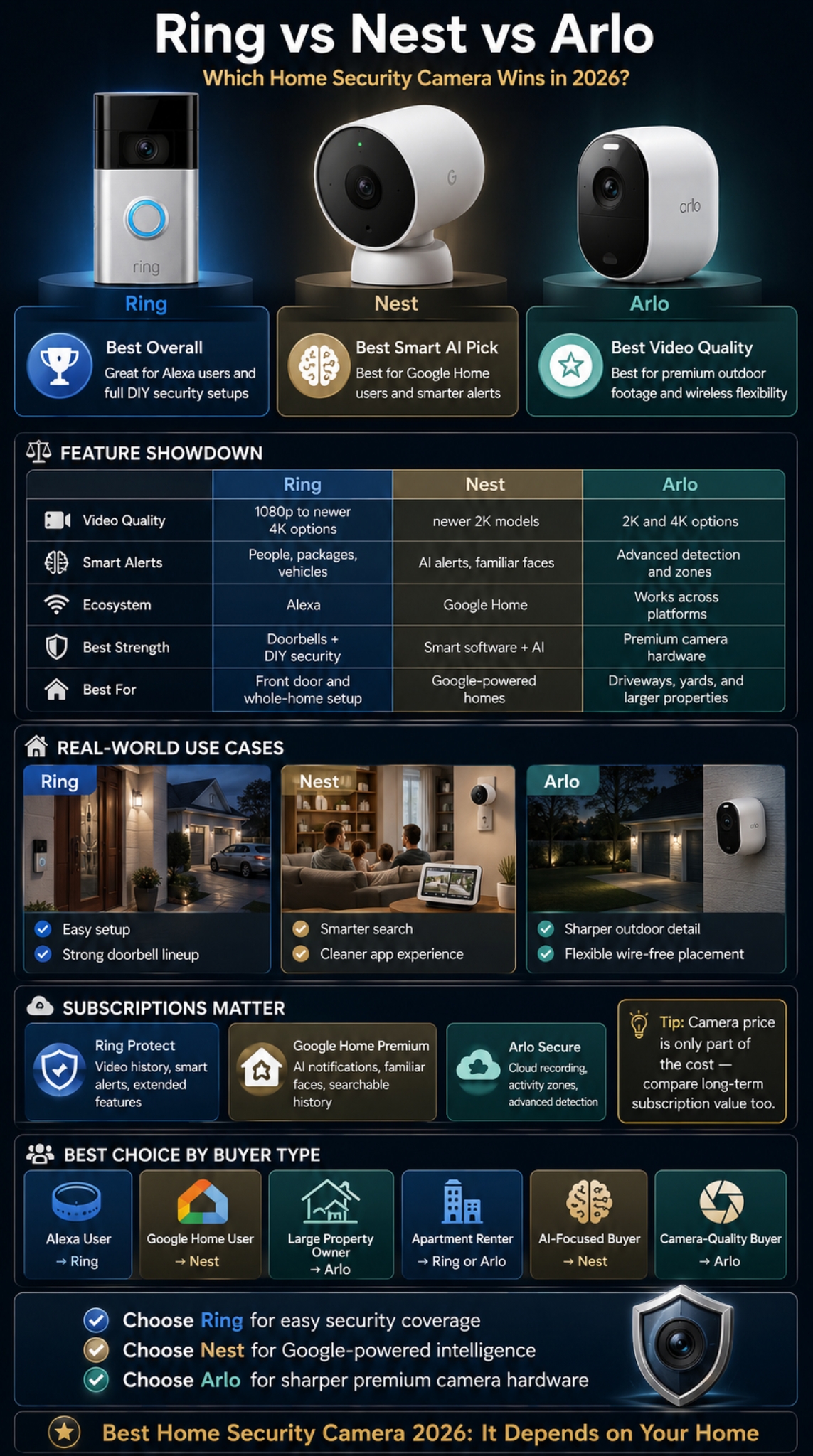
Video quality is where Arlo usually has the advantage, but Ring has closed the gap with newer 2K and 4K models. Nest also improved its lineup with 2K cameras, which is a major upgrade over older 1080p models.
For most homes, 1080p is still usable at the front door. But 2K and 4K help when you need to zoom in, read details, identify faces, or cover wider outdoor areas. Resolution alone is not everything, though. Low-light performance, HDR, field of view, motion handling, and Wi-Fi strength matter just as much.
Ring’s newer cameras are stronger than older Ring models. Nest’s newer cameras use 2K video with Gemini-powered features. Arlo’s premium cameras focus on 2K and 4K detail with color night vision.
Best for Daytime Clarity
Arlo leads for sharp detail, especially with 4K models. Ring’s newer 4K models are now much more competitive. Nest’s 2K cameras are sharp enough for most homes and pair well with Google’s AI tools.
Best for Night Footage
Arlo is strong in color night vision. Ring has improved low-light video with its newer camera models. Nest offers night vision and HDR, but some Nest models still lean more on smart detection than premium night footage.
Best for Doorbell View
Ring is still excellent for doorbells because it offers many models and strong Alexa integration. Nest is a strong doorbell choice for Google users because of its wide viewing angle and smart AI support. Arlo’s doorbell is also strong for users who want a wider view and cleaner outdoor footage.
|
Video Factor |
Ring |
Nest |
Arlo |
|
Best resolution |
Up to newer 4K models |
Newer 2K models |
Up to 4K HDR |
|
Low-light strength |
Strong on newer Pro models |
Good with HDR and night vision |
Very strong on premium models |
|
Doorbell view |
Excellent model variety |
Excellent wide view |
Strong wide view |
|
Best for zooming |
Newer 4K Ring models |
Good, not the strongest |
Strongest on 4K models |
Subscriptions and Hidden Costs
This is where many buyers get surprised. The camera price is only part of the cost. The monthly plan can matter more over three or four years.
Ring Protect adds recording, smart alerts, extended live view, device modes, and longer video playback on supported plans. Google Home Premium adds event history, familiar face detection, AI notifications, and advanced video search. Arlo Secure adds video history, smart activity zones, advanced detection, and higher-tier AI features.
The smart home industry is also moving deeper into paid AI. That means companies are using smarter alerts, video search, event summaries, and AI detection as reasons to push users toward higher subscription tiers.
Best Subscription Value
Ring usually feels more affordable for basic camera recording, especially for a simple doorbell or small home setup. Nest can be better when you have multiple compatible Google devices because Google Home Premium covers the whole home. Arlo is powerful, but the value depends on how many cameras you use.
Best Free Experience
None of the three is amazing for free users. You can usually get live view and basic alerts, but cloud recording and smart history need a plan. Nest’s newer devices may offer limited free event previews, but serious use still points toward Google Home Premium.
Long-Term Cost Warning
Before buying, calculate the total cost for three years. A cheaper camera with a higher subscription may cost more than a more expensive camera with a better multi-device plan.
|
Cost Factor |
Ring |
Nest |
Arlo |
|
Paid plan name |
Ring Protect |
Google Home Premium |
Arlo Secure |
|
Video history |
Long video playback on supported plans |
Event history and 24/7 options on select plans |
Cloud video history on paid plans |
|
AI features |
Expanding with newer Ring tools |
Strong Gemini features |
Advanced AI detection and captions |
|
Best value for |
Doorbell and DIY security |
Google households |
Premium camera setups |
|
Main concern |
Subscription needed |
Advanced features need plan |
Higher recurring cost |
Smart Alerts, AI, and App Experience
Smart alerts can make or break a security camera. A camera that sends 40 useless alerts a day becomes background noise. A good camera should tell you when something important happens and ignore what does not matter.
Ring offers useful alerts for people, packages, vehicles, and motion activity on supported plans. Google Home Premium adds AI notifications, familiar face detection, searchable history, event descriptions, and daily summaries. Arlo Secure adds object detection, activity zones, person recognition, vehicle recognition, custom detection, audio detection, captions, and video search depending on plan.
This is one of the biggest points in the ring vs nest vs arlo debate. The cameras are no longer just recording devices. They are becoming AI-powered home monitoring tools.
Ring App Experience
Ring’s app is simple and security-focused. It is easy to check cameras, answer doorbells, review clips, adjust motion zones, and connect with other Ring devices.
Nest App Experience
Nest now works through the Google Home app. That is good for people who want one app for cameras, speakers, displays, lights, and routines. Google’s newer AI features make the app more useful for searching old footage.
Arlo App Experience
Arlo gives more control to camera-focused users. It is a better fit for people who want to adjust detection zones, alerts, recording settings, and camera behavior in more detail.
|
App Feature |
Ring |
Nest |
Arlo |
|
Simple live view |
Strong |
Strong |
Strong |
|
AI video search |
Expanding |
Strong with Gemini |
Available on higher plans |
|
Familiar face alerts |
Available on newer AI features |
Strong feature |
Available on supported plans |
|
Best app for beginners |
Ring |
Nest |
Ring or Nest |
|
Best app for camera control |
Arlo |
Good |
Strong |
Privacy, Storage, and Local Control
Privacy matters with home security cameras because these devices watch real private spaces. They may record your front door, children, guests, neighbors, delivery workers, and vehicles. A cheap camera is not a good deal if you do not trust the platform.
Ring, Nest, and Arlo all use cloud-connected systems. That means users should check privacy zones, two-factor authentication, shared user access, clip sharing, notification settings, and data controls before installing cameras.
Arlo publicly emphasizes privacy as part of its brand. Ring offers privacy zones and account security settings. Google ties Nest camera features into the wider Google Home and Gemini ecosystem, which may appeal to Google users but may concern people who prefer less cloud dependence.
Best for Privacy-Conscious Users
Arlo may feel more appealing to privacy-focused buyers because it positions privacy as a core part of the brand. Still, buyers should read the latest terms before subscribing.
Best for Local Storage
Arlo has historically offered local storage options through some base station or SmartHub setups, but advanced cloud features still need a subscription. Ring and Nest are more cloud-centered for video history.
Best Privacy Practice
Use privacy zones, avoid pointing cameras directly into neighboring property, turn on two-factor authentication, and regularly remove shared access for people who no longer need it.
|
Privacy Factor |
Ring |
Nest |
Arlo |
|
Cloud recording |
Yes |
Yes |
Yes |
|
Privacy zones |
Yes |
Yes |
Yes |
|
Local storage options |
Limited |
Limited |
Better on some hub setups |
|
Best for Google users |
No |
Yes |
No |
|
Best for privacy-first buyers |
Mixed |
Mixed |
Stronger positioning |
Best Choice by Buyer Type
The best camera depends on where you live, what you want to monitor, and how much you are willing to pay each month. A renter in a small apartment does not need the same system as a homeowner with a driveway, garage, backyard, and side entrance.
This is also where ring vs nest vs arlo becomes more practical. Don’t buy the brand with the loudest marketing. Buy the one that matches your home.
Best for Renters
Ring or Arlo makes the most sense. Ring is easier if you want a simple doorbell or indoor camera. Arlo is better if you need wire-free placement and do not want permanent installation.
Best for Families
Nest is strong for families who use Google Home and want smart alerts with better context. Familiar face detection can help reduce unnecessary notifications from regular family movement.
Best for Large Homes
Arlo is a strong choice for larger properties because of its wireless camera options and premium outdoor video quality. Ring is also good if you want cameras plus alarm sensors.
Best for Budget Buyers
Ring usually gives the easiest entry point. But budget buyers should still check the subscription cost before buying. A low camera price can become less attractive after two or three years of monthly fees.
|
Buyer Type |
Best Pick |
Why |
|
Apartment renter |
Ring |
Simple indoor and doorbell setup |
|
Google Home user |
Nest |
Clean ecosystem fit |
|
Large property owner |
Arlo |
Strong outdoor video and wireless options |
|
Alexa user |
Ring |
Deep Alexa support |
|
AI-focused buyer |
Nest |
Gemini-powered camera features |
|
Camera-quality buyer |
Arlo |
2K and 4K camera strength |
|
DIY security buyer |
Ring |
Better full security ecosystem |
Buying Checklist Before You Choose
Before choosing a camera, look beyond the product photo. A home security camera needs to work every day, in bad lighting, during poor weather, and when your Wi-Fi is not perfect.
Start with the location. A front door needs a different camera than a backyard. A dark driveway may need a spotlight camera. A rental apartment may need a no-drill indoor camera.
Then check the subscription. If you need video history, person alerts, package detection, or AI search, you will probably pay monthly.
Check Your Wi-Fi First
Security cameras need reliable Wi-Fi. A 4K camera is useless if your router is weak near the garage or front gate. Before buying a premium camera, check your internet speed and signal strength in the exact spot where the camera will be installed.
Pick the Right Power Type
Battery cameras are flexible, but you must charge them. Wired cameras are more reliable, but installation takes more effort. Solar can help outdoors, but it depends on sunlight.
Think About Your Ecosystem
Choose Ring if you use Alexa. Choose Nest if you use Google Home. Choose Arlo if camera quality and placement matter more than platform loyalty.
|
Checklist Item |
Why It Matters |
|
Camera location |
Determines field of view, power type, and weather needs |
|
Video resolution |
Helps with zooming and identifying details |
|
Night vision |
Important for driveways, porches, and side yards |
|
Subscription cost |
Affects long-term value |
|
Smart home ecosystem |
Makes daily use easier |
|
Privacy controls |
Protects family and neighbors |
|
Wi-Fi strength |
Prevents lag, missed clips, and poor video |
Final Thoughts
There is no single winner for everyone. But there is a clear winner for each type of buyer.
Ring is the best pick for most people who want easy setup, strong doorbells, Alexa support, and a full DIY security ecosystem. Nest is the best pick for Google Home users who want cleaner AI alerts, familiar face detection, and Gemini-powered video search. Arlo is the best pick for people who care most about camera quality, wireless outdoor coverage, and premium 2K or 4K footage.
The smartest move is to avoid buying only by camera price. In 2026, the real cost is camera plus subscription plus ecosystem lock-in. A cheaper camera can become expensive if the monthly plan feels unavoidable. A pricier camera can be worth it if it gives better coverage, fewer false alerts, and footage you can actually use.
For most homes, the ring vs nest vs arlo decision should come down to this: choose Ring for security coverage, Nest for Google-powered intelligence, and Arlo for sharper camera hardware.
Frequently Asked Questions About Ring vs Nest vs Arlo
Which Is Better Without a Subscription: Ring, Nest, or Arlo?
None of them is perfect without a subscription. You can usually access live view and basic alerts, but cloud recording, longer video history, and advanced smart alerts often need a paid plan. Nest’s newer cameras may offer limited free event previews, but full video history still needs Google Home Premium.
Is Arlo Better Than Ring for Outdoor Cameras?
Arlo is usually better for outdoor camera quality, especially if you choose a 2K or 4K model. Ring is better if you want outdoor cameras as part of a bigger DIY security setup with doorbells, alarms, and Alexa support.
Is Nest Better Than Ring for Smart Alerts?
Nest is better if you want Google-powered AI features like familiar face detection, event descriptions, and searchable video history. Ring has improved its alerts and AI tools, but Nest feels stronger for people already using Google Home.
Which Camera Brand Is Best for Apartments?
Ring is the easiest pick for most apartments because it has simple indoor cameras and doorbells. Arlo is also good if you need wire-free placement. Nest makes sense if your apartment already uses Google Home devices.
Which Brand Has the Best Video Doorbell in 2026?
Ring has the strongest overall doorbell lineup because it offers many models and polished Alexa support. Nest’s newer wired doorbell is a strong choice for Google users because it offers 2K video, a wide field of view, and Gemini-powered features.
Do Ring, Nest, and Arlo Work During a Wi-Fi Outage?
Most Wi-Fi cameras need internet for live view, cloud recording, and alerts. Some systems may have limited backup options, but buyers should not expect full smart camera features without internet. For serious outage protection, check each model’s local storage, hub, and cellular backup options before buying.
Which Is Better for Privacy: Ring, Nest, or Arlo?
Arlo may appeal more to privacy-focused buyers because the company clearly markets privacy as a priority. But privacy depends on settings too. Use two-factor authentication, privacy zones, careful camera placement, and limited account sharing no matter which brand you choose.